> ## Documentation Index
> Fetch the complete documentation index at: https://docs-staging-fix-supported-algorithms.mintlify.site/llms.txt
> Use this file to discover all available pages before exploring further.

> Learn how to configure an update policy form using Forms for Actions for users to review and accept new terms of service or consent updates.

# Use Cases: Configure an update policy form using Forms

<Card title="Before you start">
  1. Create a [Machine-to-Machine Application](/docs/get-started/auth0-overview/create-applications/machine-to-machine-apps) with the following scopes enabled:

  * `read:users`
  * `update:users`
  * `create:users`
  * `read:users_app_metadata`
  * `update:users_app_metadata`
  * `create:users_app_metadata`

  2. Add a [Vault connection](/docs/customize/forms/vault) using the M2M application credentials.
</Card>

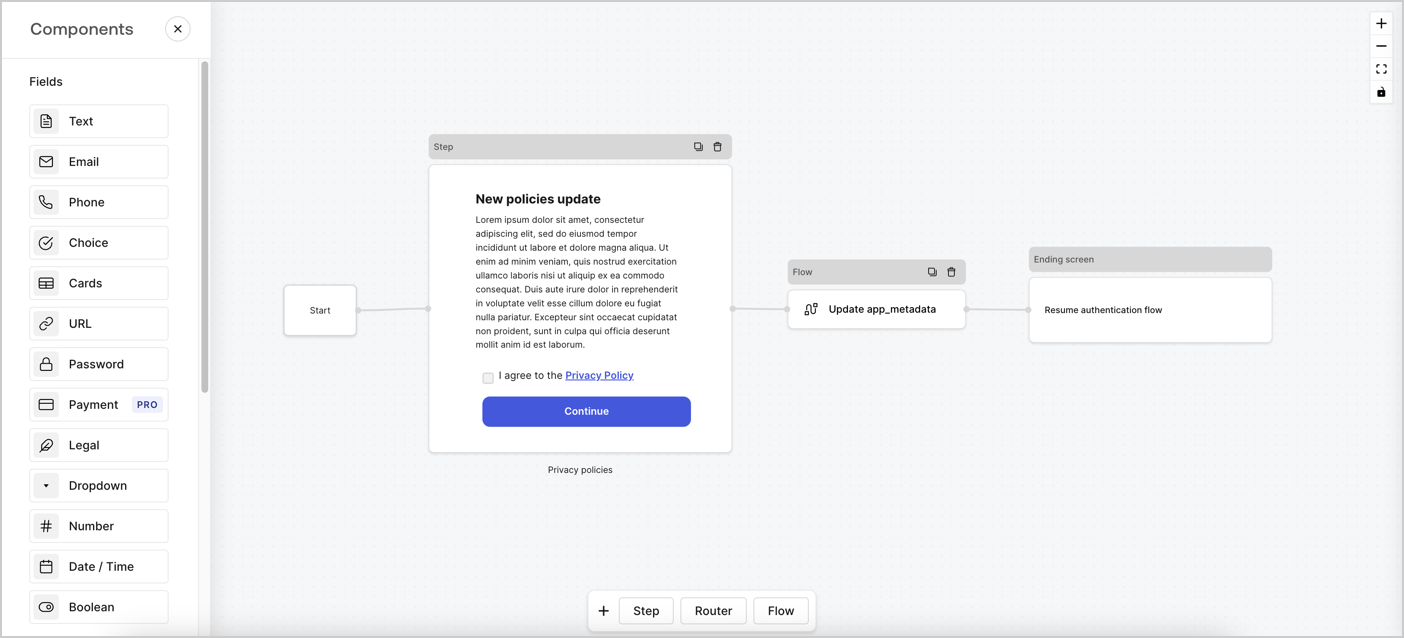
Forms for Actions allows you to create custom privacy policies flows and store the consent under the `app_metadata` object.
<Frame>
  <img src="https://mintcdn.com/docs-staging-fix-supported-algorithms/aalaFKwb0BuWR5gW/docs/images/cdy7uua7fh8z/6i68dMvHDTijfRmSgN1x8Q/ad900e7d4c0fb34645921435472b8684/privavy-policy-form.png?fit=max&auto=format&n=aalaFKwb0BuWR5gW&q=85&s=ab607708e56652a86db796df18aa5706" alt="Dashboard > Actions > Forms > Privacy policy use case" data-og-width="1404" width="1404" data-og-height="638" height="638" data-path="docs/images/cdy7uua7fh8z/6i68dMvHDTijfRmSgN1x8Q/ad900e7d4c0fb34645921435472b8684/privavy-policy-form.png" data-optimize="true" data-opv="3" srcset="https://mintcdn.com/docs-staging-fix-supported-algorithms/aalaFKwb0BuWR5gW/docs/images/cdy7uua7fh8z/6i68dMvHDTijfRmSgN1x8Q/ad900e7d4c0fb34645921435472b8684/privavy-policy-form.png?w=280&fit=max&auto=format&n=aalaFKwb0BuWR5gW&q=85&s=689a26520e4db3590bc603bfbdb3dd22 280w, https://mintcdn.com/docs-staging-fix-supported-algorithms/aalaFKwb0BuWR5gW/docs/images/cdy7uua7fh8z/6i68dMvHDTijfRmSgN1x8Q/ad900e7d4c0fb34645921435472b8684/privavy-policy-form.png?w=560&fit=max&auto=format&n=aalaFKwb0BuWR5gW&q=85&s=c83a9c0cf301bbb9deea424bf83161be 560w, https://mintcdn.com/docs-staging-fix-supported-algorithms/aalaFKwb0BuWR5gW/docs/images/cdy7uua7fh8z/6i68dMvHDTijfRmSgN1x8Q/ad900e7d4c0fb34645921435472b8684/privavy-policy-form.png?w=840&fit=max&auto=format&n=aalaFKwb0BuWR5gW&q=85&s=b34fe79ba24f16bea55b93defd53b035 840w, https://mintcdn.com/docs-staging-fix-supported-algorithms/aalaFKwb0BuWR5gW/docs/images/cdy7uua7fh8z/6i68dMvHDTijfRmSgN1x8Q/ad900e7d4c0fb34645921435472b8684/privavy-policy-form.png?w=1100&fit=max&auto=format&n=aalaFKwb0BuWR5gW&q=85&s=7d682710edb0c501464170714089c215 1100w, https://mintcdn.com/docs-staging-fix-supported-algorithms/aalaFKwb0BuWR5gW/docs/images/cdy7uua7fh8z/6i68dMvHDTijfRmSgN1x8Q/ad900e7d4c0fb34645921435472b8684/privavy-policy-form.png?w=1650&fit=max&auto=format&n=aalaFKwb0BuWR5gW&q=85&s=ff540212b73f927d314810167ef9e0f8 1650w, https://mintcdn.com/docs-staging-fix-supported-algorithms/aalaFKwb0BuWR5gW/docs/images/cdy7uua7fh8z/6i68dMvHDTijfRmSgN1x8Q/ad900e7d4c0fb34645921435472b8684/privavy-policy-form.png?w=2500&fit=max&auto=format&n=aalaFKwb0BuWR5gW&q=85&s=49c0699900b3295cd8114a239902d8b3 2500w" />
</Frame>

The sections below outline how you can create an Update Policy form using nodes and flows, along with steps for adding your form to a [Post Login](/docs/customize/actions/explore-triggers/signup-and-login-triggers/login-trigger) Action.

## Create a form from scratch

Follow these steps to create a form to gather information:

1. Open the Form editor by selecting **Auth0 Dashboard > Actions > Forms.**
2. Select **Create Form** > **Start from scratch**.

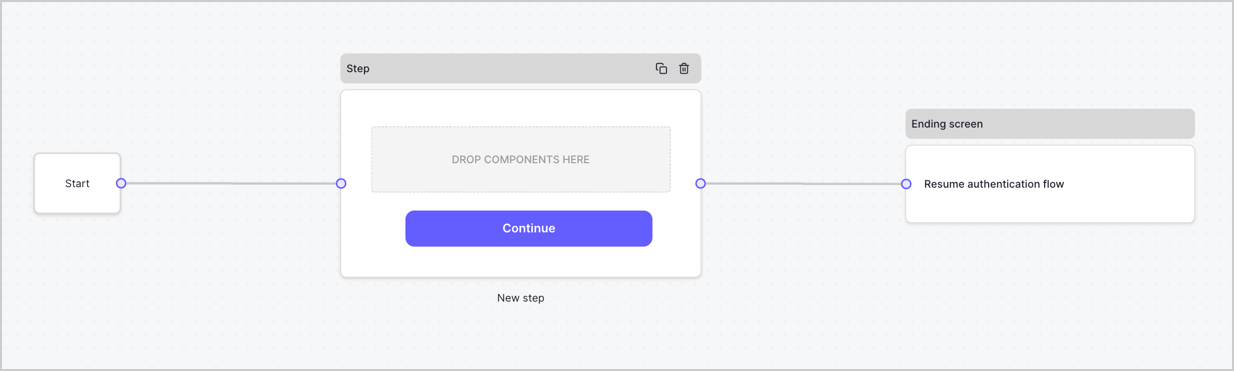
By default, a new form contains a Start node, a Step node, and an Ending screen node.
<Frame>
  <img src="https://mintcdn.com/docs-staging-fix-supported-algorithms/wxiKF60vhkNATp8K/docs/images/cdy7uua7fh8z/2TZ9jSjgEcARFpULI6hz4R/a4319a1bd482f2ee5cc23100fdb2f42c/New-form-Forms-for-action-use-case.png?fit=max&auto=format&n=wxiKF60vhkNATp8K&q=85&s=e1935e70127d94f40551cded3d7c63ca" alt="Dashboard > Forms > Use Cases > Form" data-og-width="1234" width="1234" data-og-height="371" height="371" data-path="docs/images/cdy7uua7fh8z/2TZ9jSjgEcARFpULI6hz4R/a4319a1bd482f2ee5cc23100fdb2f42c/New-form-Forms-for-action-use-case.png" data-optimize="true" data-opv="3" srcset="https://mintcdn.com/docs-staging-fix-supported-algorithms/wxiKF60vhkNATp8K/docs/images/cdy7uua7fh8z/2TZ9jSjgEcARFpULI6hz4R/a4319a1bd482f2ee5cc23100fdb2f42c/New-form-Forms-for-action-use-case.png?w=280&fit=max&auto=format&n=wxiKF60vhkNATp8K&q=85&s=b730d4d4c3baab151582423824b6c338 280w, https://mintcdn.com/docs-staging-fix-supported-algorithms/wxiKF60vhkNATp8K/docs/images/cdy7uua7fh8z/2TZ9jSjgEcARFpULI6hz4R/a4319a1bd482f2ee5cc23100fdb2f42c/New-form-Forms-for-action-use-case.png?w=560&fit=max&auto=format&n=wxiKF60vhkNATp8K&q=85&s=d4c091402e4c529fad64eef2b2b1740a 560w, https://mintcdn.com/docs-staging-fix-supported-algorithms/wxiKF60vhkNATp8K/docs/images/cdy7uua7fh8z/2TZ9jSjgEcARFpULI6hz4R/a4319a1bd482f2ee5cc23100fdb2f42c/New-form-Forms-for-action-use-case.png?w=840&fit=max&auto=format&n=wxiKF60vhkNATp8K&q=85&s=2b869787fbb01d4170708bc73505c8f0 840w, https://mintcdn.com/docs-staging-fix-supported-algorithms/wxiKF60vhkNATp8K/docs/images/cdy7uua7fh8z/2TZ9jSjgEcARFpULI6hz4R/a4319a1bd482f2ee5cc23100fdb2f42c/New-form-Forms-for-action-use-case.png?w=1100&fit=max&auto=format&n=wxiKF60vhkNATp8K&q=85&s=8c5ae7d8b25c310f6b7406f5a670e56e 1100w, https://mintcdn.com/docs-staging-fix-supported-algorithms/wxiKF60vhkNATp8K/docs/images/cdy7uua7fh8z/2TZ9jSjgEcARFpULI6hz4R/a4319a1bd482f2ee5cc23100fdb2f42c/New-form-Forms-for-action-use-case.png?w=1650&fit=max&auto=format&n=wxiKF60vhkNATp8K&q=85&s=0f19b91cc2648886abea0e8ff1ea8b4c 1650w, https://mintcdn.com/docs-staging-fix-supported-algorithms/wxiKF60vhkNATp8K/docs/images/cdy7uua7fh8z/2TZ9jSjgEcARFpULI6hz4R/a4319a1bd482f2ee5cc23100fdb2f42c/New-form-Forms-for-action-use-case.png?w=2500&fit=max&auto=format&n=wxiKF60vhkNATp8K&q=85&s=3f0eb82316773b0ae3ebc34e02a52232 2500w" />
</Frame>

### Configure the Step node

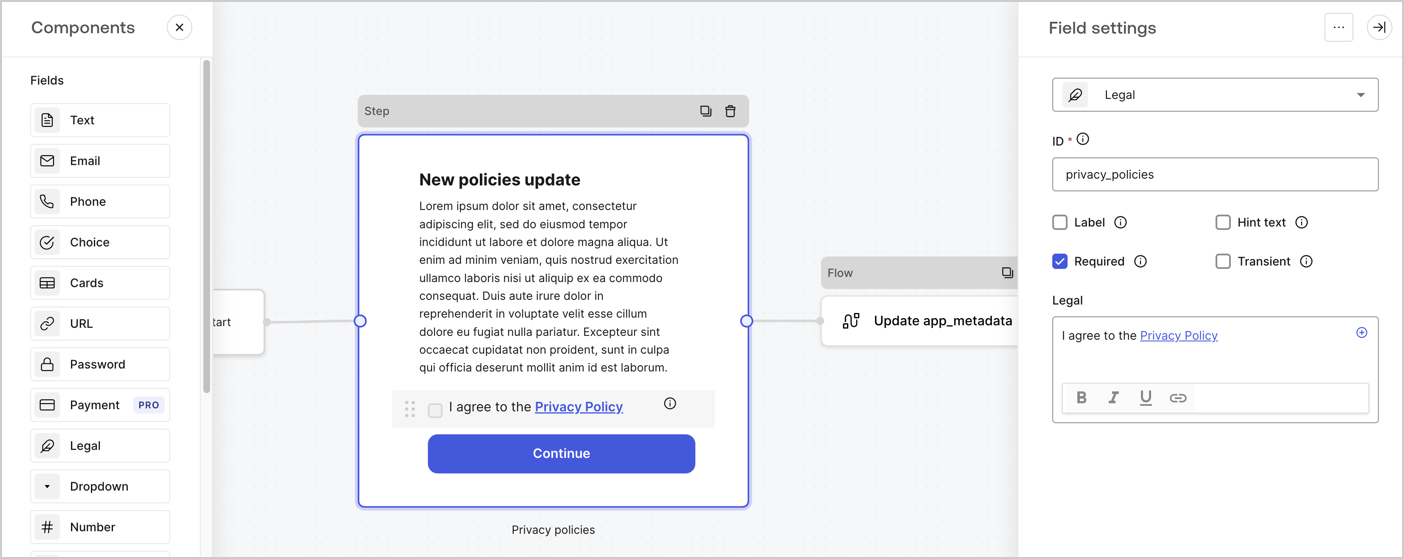
The Step node is the graphical interface visible to users. Add [Fields](/docs/customize/forms/nodes-and-components) to the Step node to collect the new agreement acceptance value by following these steps:

1. Drag a **Rich text** field from the **Components menu** into the **Step** node.

   * **Rich text**: Enter a description of your privacy policies updates.
   * Select **Save**.
2. Drag a **Legal** field into the **Step** node.

   * **ID**: Enter `privacy_policies`.
   * **Required**: Enable the checkbox.
   * **Legal**: Enter `I agree to the Privacy Policy`.
   * Select **Save**.
3. Select **Publish** to save.
<Frame>
  <img src="https://mintcdn.com/docs-staging-fix-supported-algorithms/1E-rbxgbgNUEtdtp/docs/images/cdy7uua7fh8z/59zFFjQjAnjogkc2QGIqqJ/0ad66b1b636544122aa4e65968b76c2c/privacy-policy-step-node.png?fit=max&auto=format&n=1E-rbxgbgNUEtdtp&q=85&s=93c2487f355cae216a266275de5728d6" alt="Dashboard > Actions > Forms > Use case privacy policy step node" data-og-width="1404" width="1404" data-og-height="559" height="559" data-path="docs/images/cdy7uua7fh8z/59zFFjQjAnjogkc2QGIqqJ/0ad66b1b636544122aa4e65968b76c2c/privacy-policy-step-node.png" data-optimize="true" data-opv="3" srcset="https://mintcdn.com/docs-staging-fix-supported-algorithms/1E-rbxgbgNUEtdtp/docs/images/cdy7uua7fh8z/59zFFjQjAnjogkc2QGIqqJ/0ad66b1b636544122aa4e65968b76c2c/privacy-policy-step-node.png?w=280&fit=max&auto=format&n=1E-rbxgbgNUEtdtp&q=85&s=75fd0deb638872f341162526fc7d24f0 280w, https://mintcdn.com/docs-staging-fix-supported-algorithms/1E-rbxgbgNUEtdtp/docs/images/cdy7uua7fh8z/59zFFjQjAnjogkc2QGIqqJ/0ad66b1b636544122aa4e65968b76c2c/privacy-policy-step-node.png?w=560&fit=max&auto=format&n=1E-rbxgbgNUEtdtp&q=85&s=5bf557268d00e02e9fe2fbbdc2b47757 560w, https://mintcdn.com/docs-staging-fix-supported-algorithms/1E-rbxgbgNUEtdtp/docs/images/cdy7uua7fh8z/59zFFjQjAnjogkc2QGIqqJ/0ad66b1b636544122aa4e65968b76c2c/privacy-policy-step-node.png?w=840&fit=max&auto=format&n=1E-rbxgbgNUEtdtp&q=85&s=5a6506c3a00223a51d021e2b24a7459a 840w, https://mintcdn.com/docs-staging-fix-supported-algorithms/1E-rbxgbgNUEtdtp/docs/images/cdy7uua7fh8z/59zFFjQjAnjogkc2QGIqqJ/0ad66b1b636544122aa4e65968b76c2c/privacy-policy-step-node.png?w=1100&fit=max&auto=format&n=1E-rbxgbgNUEtdtp&q=85&s=81a4fd7432609461f1007458a6295fcb 1100w, https://mintcdn.com/docs-staging-fix-supported-algorithms/1E-rbxgbgNUEtdtp/docs/images/cdy7uua7fh8z/59zFFjQjAnjogkc2QGIqqJ/0ad66b1b636544122aa4e65968b76c2c/privacy-policy-step-node.png?w=1650&fit=max&auto=format&n=1E-rbxgbgNUEtdtp&q=85&s=0f76e6e8894a9f85b4e6ce5dd51cca75 1650w, https://mintcdn.com/docs-staging-fix-supported-algorithms/1E-rbxgbgNUEtdtp/docs/images/cdy7uua7fh8z/59zFFjQjAnjogkc2QGIqqJ/0ad66b1b636544122aa4e65968b76c2c/privacy-policy-step-node.png?w=2500&fit=max&auto=format&n=1E-rbxgbgNUEtdtp&q=85&s=bebffd088a893d358262b25f27ad2228 2500w" />
</Frame>

### Configure the Flow node

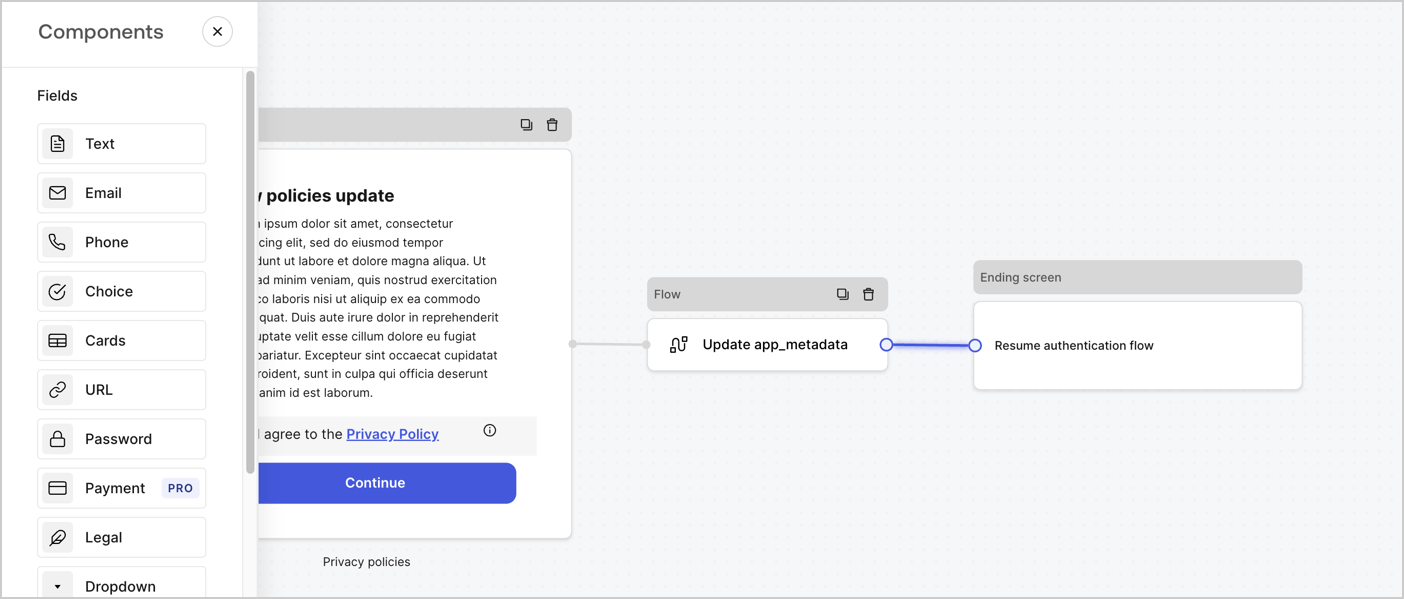
Add a **Flow** node after the **Step** node to update the `app_metadata` and resume the authentication flow by following these steps:

1. Select **Flow** from the bottom of the Form editor.
2. Remove the existing link between the **Step** and **Ending Screen** nodes.
3. Select the new **Flow** > **Click to add a flow** > **Create a new flow.**

   * Enter `Update app_metadata` in the **Name** field.
   * Select **Create**.
   * Select **Save**.
4. Link the **Flow** node to the **Step** and **Ending Screen** nodes as pictured below.
5. Select **Publish** to save.
<Frame>
  <img src="https://mintcdn.com/docs-staging-fix-supported-algorithms/aalaFKwb0BuWR5gW/docs/images/cdy7uua7fh8z/6YIkzm7SrpM9LW76AXuRzh/353c518fe82bbaa440836da1d83596d6/link-policies.png?fit=max&auto=format&n=aalaFKwb0BuWR5gW&q=85&s=bf62305cb2902dece8982b815ec2382e" alt="Dashboard > Actions > Forms > Form" data-og-width="1404" width="1404" data-og-height="599" height="599" data-path="docs/images/cdy7uua7fh8z/6YIkzm7SrpM9LW76AXuRzh/353c518fe82bbaa440836da1d83596d6/link-policies.png" data-optimize="true" data-opv="3" srcset="https://mintcdn.com/docs-staging-fix-supported-algorithms/aalaFKwb0BuWR5gW/docs/images/cdy7uua7fh8z/6YIkzm7SrpM9LW76AXuRzh/353c518fe82bbaa440836da1d83596d6/link-policies.png?w=280&fit=max&auto=format&n=aalaFKwb0BuWR5gW&q=85&s=79c5316a9c9ca202548fafcfba25ee4d 280w, https://mintcdn.com/docs-staging-fix-supported-algorithms/aalaFKwb0BuWR5gW/docs/images/cdy7uua7fh8z/6YIkzm7SrpM9LW76AXuRzh/353c518fe82bbaa440836da1d83596d6/link-policies.png?w=560&fit=max&auto=format&n=aalaFKwb0BuWR5gW&q=85&s=27836f58701e810974ab6e8acd41f358 560w, https://mintcdn.com/docs-staging-fix-supported-algorithms/aalaFKwb0BuWR5gW/docs/images/cdy7uua7fh8z/6YIkzm7SrpM9LW76AXuRzh/353c518fe82bbaa440836da1d83596d6/link-policies.png?w=840&fit=max&auto=format&n=aalaFKwb0BuWR5gW&q=85&s=c43d580257fa098eccbc8a5d1b612178 840w, https://mintcdn.com/docs-staging-fix-supported-algorithms/aalaFKwb0BuWR5gW/docs/images/cdy7uua7fh8z/6YIkzm7SrpM9LW76AXuRzh/353c518fe82bbaa440836da1d83596d6/link-policies.png?w=1100&fit=max&auto=format&n=aalaFKwb0BuWR5gW&q=85&s=c5d6002647b468a9ab60d0be765e2e0a 1100w, https://mintcdn.com/docs-staging-fix-supported-algorithms/aalaFKwb0BuWR5gW/docs/images/cdy7uua7fh8z/6YIkzm7SrpM9LW76AXuRzh/353c518fe82bbaa440836da1d83596d6/link-policies.png?w=1650&fit=max&auto=format&n=aalaFKwb0BuWR5gW&q=85&s=c39b376be92d2715c5cf7a8c6194c781 1650w, https://mintcdn.com/docs-staging-fix-supported-algorithms/aalaFKwb0BuWR5gW/docs/images/cdy7uua7fh8z/6YIkzm7SrpM9LW76AXuRzh/353c518fe82bbaa440836da1d83596d6/link-policies.png?w=2500&fit=max&auto=format&n=aalaFKwb0BuWR5gW&q=85&s=5175a224939a867d02035dc88127897a 2500w" />
</Frame>

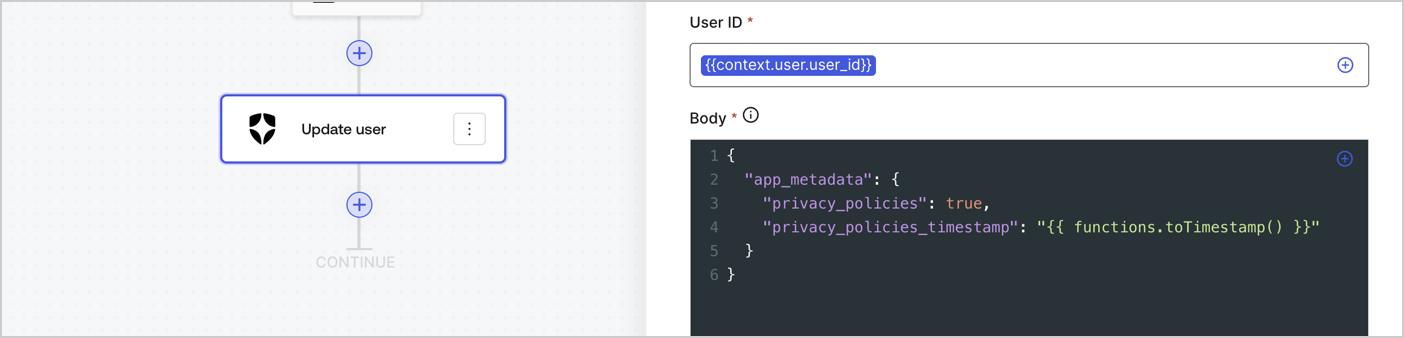
Add an Auth0 Update user action to the flow by following these steps:

1. Select the **Flow** **Update app\_metadata** > **Edit flow** to open the Flow editor in a new tab.
2. Below the StartAction, select the **+** icon to add an **Update user** action. Complete the fields below, then select **Save** to continue.

   * **Connection**: Select from the dropdown the Vault connection to your M2M application.

   * **User ID**: Enter `{{context.user.user_id}}`.

   * **Body**: Copy and paste the following code to update the app\_metadata with the privacy\_policies and privacy\_policies\_timestamp properties.

     ```text lines theme={null}
     {
       "app_metadata": {
         "privacy_policies": true,
         "privacy_policies_timestamp": "{{ functions.toTimestamp() }}"
       }
     }
     ```

   * Select **Save**.
3. Select **Publish** to save.
<Frame>
  <img src="https://mintcdn.com/docs-staging-fix-supported-algorithms/bMnCU7KKXlXcVM4-/docs/images/cdy7uua7fh8z/CvMNIwWrOUwaFW4X3G28p/1fb70ae57a20749d9ffaaba8dc0b7e26/update-user-privacy.png?fit=max&auto=format&n=bMnCU7KKXlXcVM4-&q=85&s=b86b4fc49611142b80be6d1756efa228" alt="Dashboard > Actions > Forms > User case privacy policy code" data-og-width="1404" width="1404" data-og-height="338" height="338" data-path="docs/images/cdy7uua7fh8z/CvMNIwWrOUwaFW4X3G28p/1fb70ae57a20749d9ffaaba8dc0b7e26/update-user-privacy.png" data-optimize="true" data-opv="3" srcset="https://mintcdn.com/docs-staging-fix-supported-algorithms/bMnCU7KKXlXcVM4-/docs/images/cdy7uua7fh8z/CvMNIwWrOUwaFW4X3G28p/1fb70ae57a20749d9ffaaba8dc0b7e26/update-user-privacy.png?w=280&fit=max&auto=format&n=bMnCU7KKXlXcVM4-&q=85&s=34a6dd9c0ecbcf65feac766a5bb08a36 280w, https://mintcdn.com/docs-staging-fix-supported-algorithms/bMnCU7KKXlXcVM4-/docs/images/cdy7uua7fh8z/CvMNIwWrOUwaFW4X3G28p/1fb70ae57a20749d9ffaaba8dc0b7e26/update-user-privacy.png?w=560&fit=max&auto=format&n=bMnCU7KKXlXcVM4-&q=85&s=9dbe28c7c7dd4f51c56ffb82189f9520 560w, https://mintcdn.com/docs-staging-fix-supported-algorithms/bMnCU7KKXlXcVM4-/docs/images/cdy7uua7fh8z/CvMNIwWrOUwaFW4X3G28p/1fb70ae57a20749d9ffaaba8dc0b7e26/update-user-privacy.png?w=840&fit=max&auto=format&n=bMnCU7KKXlXcVM4-&q=85&s=9bdcdf276b951b85d7ce525d470c64c5 840w, https://mintcdn.com/docs-staging-fix-supported-algorithms/bMnCU7KKXlXcVM4-/docs/images/cdy7uua7fh8z/CvMNIwWrOUwaFW4X3G28p/1fb70ae57a20749d9ffaaba8dc0b7e26/update-user-privacy.png?w=1100&fit=max&auto=format&n=bMnCU7KKXlXcVM4-&q=85&s=b050879197097104d3ec1567f8ff9bc5 1100w, https://mintcdn.com/docs-staging-fix-supported-algorithms/bMnCU7KKXlXcVM4-/docs/images/cdy7uua7fh8z/CvMNIwWrOUwaFW4X3G28p/1fb70ae57a20749d9ffaaba8dc0b7e26/update-user-privacy.png?w=1650&fit=max&auto=format&n=bMnCU7KKXlXcVM4-&q=85&s=97c55ba9c48e92f25deb77bd663057b1 1650w, https://mintcdn.com/docs-staging-fix-supported-algorithms/bMnCU7KKXlXcVM4-/docs/images/cdy7uua7fh8z/CvMNIwWrOUwaFW4X3G28p/1fb70ae57a20749d9ffaaba8dc0b7e26/update-user-privacy.png?w=2500&fit=max&auto=format&n=bMnCU7KKXlXcVM4-&q=85&s=8f89a125302ddc389b19a27afdc9d0a0 2500w" />
</Frame>

<Callout icon="file-lines" color="#0EA5E9" iconType="regular">
  The flow **Update app\_metadata** adds a `privacy_policies true` value to the app`_metadata` object and also generates a timestamp with a [helper function.](/docs/customize/forms/variables)
</Callout>

## Retrieve the form render code

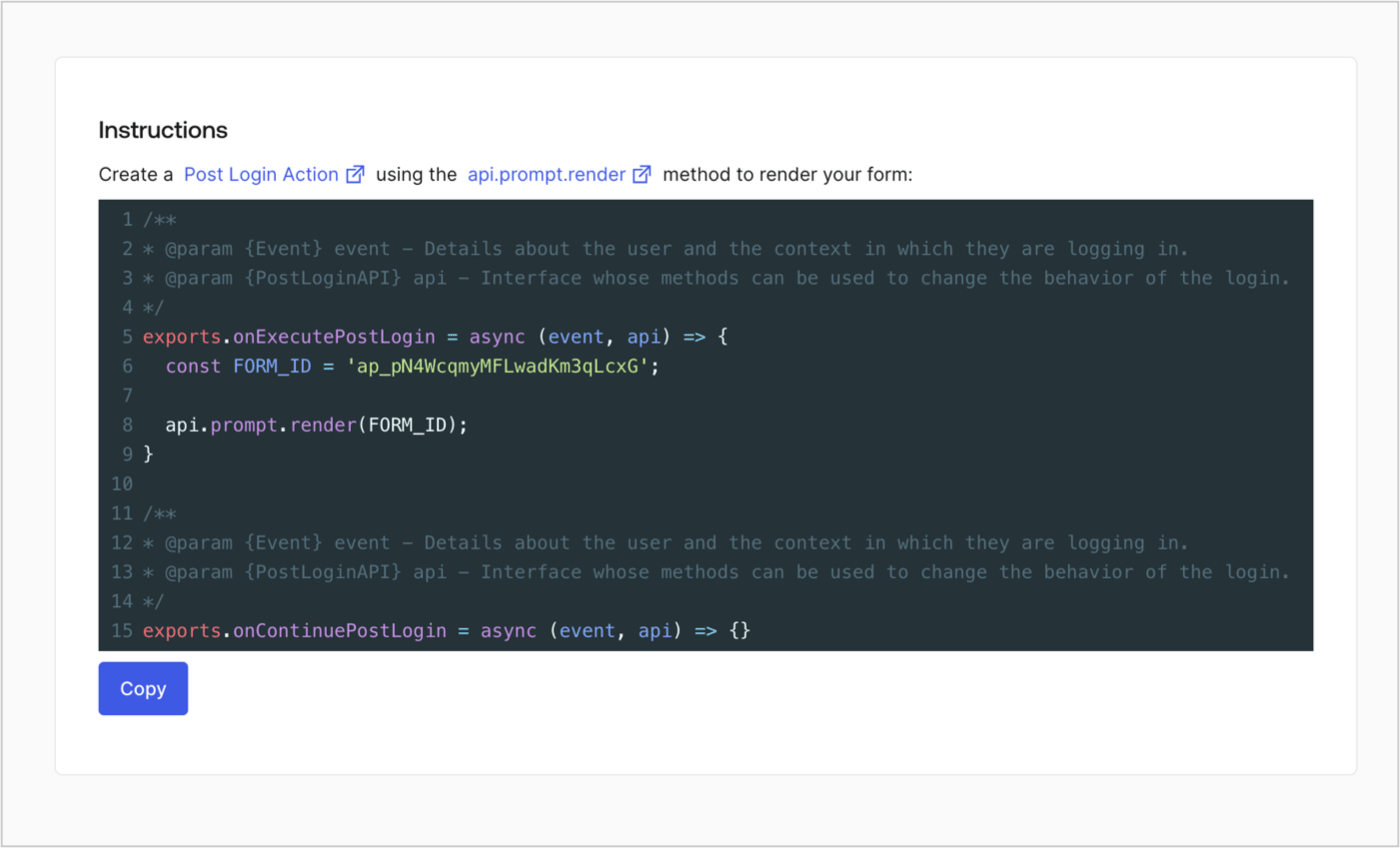
Retrieve your form render code to visually render the form with a custom Post Login Action by following these steps:

* From the Form editor, select **`<> Render`**.
* Select **Copy**.
<Frame>
  <img src="https://mintcdn.com/docs-staging-fix-supported-algorithms/7l-kzL8MpUI_oreH/docs/images/cdy7uua7fh8z/2EIUzc539sq9lwoTKbjoJv/496a864c0fc44a782c9cadca119dbfb0/embed.png?fit=max&auto=format&n=7l-kzL8MpUI_oreH&q=85&s=4b44378d567bf86b98281b72d97900af" alt="Dashboard > Actions > Forms > Form > Embed" data-og-width="1400" width="1400" data-og-height="848" height="848" data-path="docs/images/cdy7uua7fh8z/2EIUzc539sq9lwoTKbjoJv/496a864c0fc44a782c9cadca119dbfb0/embed.png" data-optimize="true" data-opv="3" srcset="https://mintcdn.com/docs-staging-fix-supported-algorithms/7l-kzL8MpUI_oreH/docs/images/cdy7uua7fh8z/2EIUzc539sq9lwoTKbjoJv/496a864c0fc44a782c9cadca119dbfb0/embed.png?w=280&fit=max&auto=format&n=7l-kzL8MpUI_oreH&q=85&s=b39f48a1bdf1d5ae795808a4065dc63e 280w, https://mintcdn.com/docs-staging-fix-supported-algorithms/7l-kzL8MpUI_oreH/docs/images/cdy7uua7fh8z/2EIUzc539sq9lwoTKbjoJv/496a864c0fc44a782c9cadca119dbfb0/embed.png?w=560&fit=max&auto=format&n=7l-kzL8MpUI_oreH&q=85&s=1cfa8f56cec8589ca6d2ccea5ea3c0ad 560w, https://mintcdn.com/docs-staging-fix-supported-algorithms/7l-kzL8MpUI_oreH/docs/images/cdy7uua7fh8z/2EIUzc539sq9lwoTKbjoJv/496a864c0fc44a782c9cadca119dbfb0/embed.png?w=840&fit=max&auto=format&n=7l-kzL8MpUI_oreH&q=85&s=376a09a5179cdfbbe94621296bb3f333 840w, https://mintcdn.com/docs-staging-fix-supported-algorithms/7l-kzL8MpUI_oreH/docs/images/cdy7uua7fh8z/2EIUzc539sq9lwoTKbjoJv/496a864c0fc44a782c9cadca119dbfb0/embed.png?w=1100&fit=max&auto=format&n=7l-kzL8MpUI_oreH&q=85&s=cd5a7838f18665dab9168eb650fc80a5 1100w, https://mintcdn.com/docs-staging-fix-supported-algorithms/7l-kzL8MpUI_oreH/docs/images/cdy7uua7fh8z/2EIUzc539sq9lwoTKbjoJv/496a864c0fc44a782c9cadca119dbfb0/embed.png?w=1650&fit=max&auto=format&n=7l-kzL8MpUI_oreH&q=85&s=34225aada362ebe0c318c6fb64fff459 1650w, https://mintcdn.com/docs-staging-fix-supported-algorithms/7l-kzL8MpUI_oreH/docs/images/cdy7uua7fh8z/2EIUzc539sq9lwoTKbjoJv/496a864c0fc44a782c9cadca119dbfb0/embed.png?w=2500&fit=max&auto=format&n=7l-kzL8MpUI_oreH&q=85&s=c2ad389603559c12542e534d9a8d7906 2500w" />
</Frame>

## Create a Post Login Action

Create a post-login Action to render your form by following these steps:

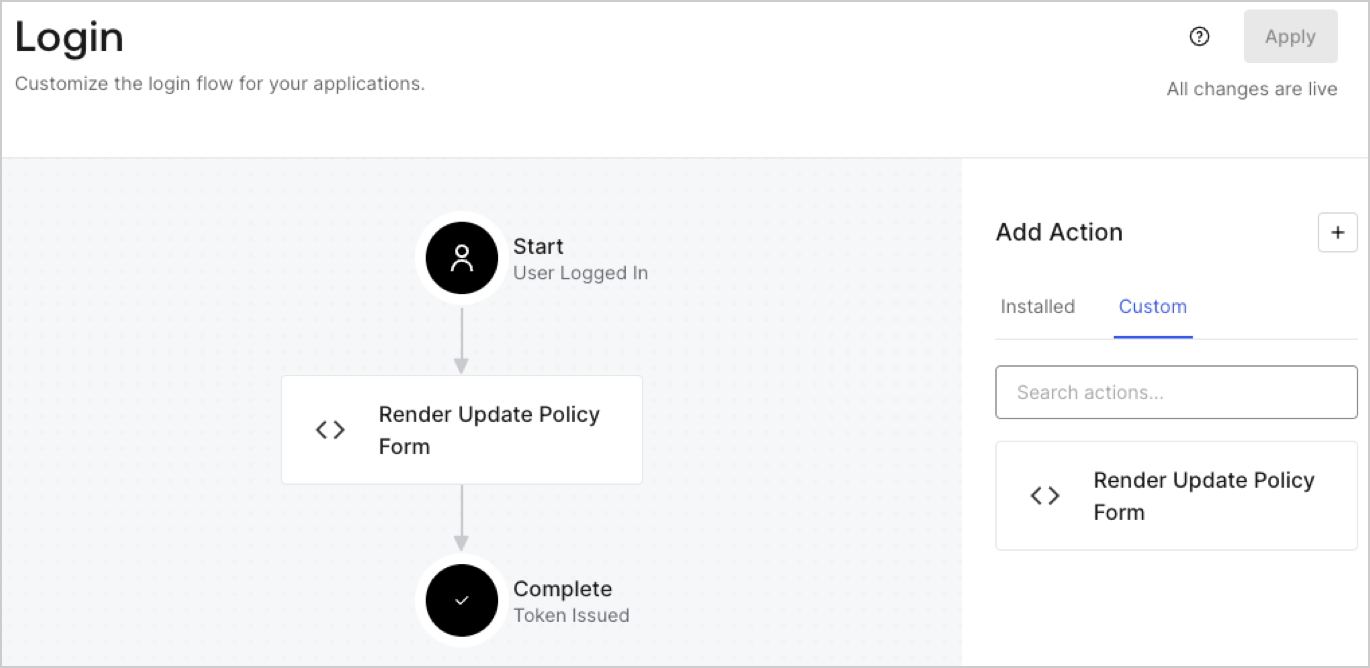
1. Navigate to **Auth0 Dashboard > Actions > Flows > Login.**
2. Select the **+** icon and Select **Build from scratch**:

   * **Name**: Enter `Render Update Policy Form`.
   * **Trigger**: Select `Login / Post Login`.
   * **Runtime**: Select the recommended version.
3. Select **Create**.

To configure the post-login Action:

1. Delete the existing code from the Code editor.
2. Paste the form render code into the Code editor.
3. Edit the code to define the conditional logic that will render the form.

   ```javascript lines theme={null}
   /**
   * @param {Event} event - Details about the user and the context in which they are logging in.
   * @param {PostLoginAPI} api - Interface whose methods can be used to change the behavior of the login.
   */
   exports.onExecutePostLogin = async (event, api) => {
     const FORM_ID = 'REPLACE_WITH_YOUR_FORM_ID';

     if (event.user.app_metadata.privacy_policies !== true) {
       api.prompt.render(FORM_ID);
     }
   }

   exports.onContinuePostLogin = async (event, api) => { }
   ```

   <Callout icon="file-lines" color="#0EA5E9" iconType="regular">
     The example code above will render the form when a user is missing the app metadata `privacy_policies` property.
   </Callout>
4. Select **Deploy.**
5. Drag and Drop the **Render Update Policy Form** Action to the **Login** flow.
   <Frame>
     <img src="https://mintcdn.com/docs-staging-fix-supported-algorithms/eTw0rUs7XUTRYWra/docs/images/cdy7uua7fh8z/5TOwDgevZsBqd7yZynUYWU/41ca909dc3007aed4f40ff794a05efa5/postlogin.png?fit=max&auto=format&n=eTw0rUs7XUTRYWra&q=85&s=5cf693d1e7bf6d12bcbb2f2ea202e73b" alt="Dashboard > Forms > Use Case > Render update policy form login action" data-og-width="1370" width="1370" data-og-height="668" height="668" data-path="docs/images/cdy7uua7fh8z/5TOwDgevZsBqd7yZynUYWU/41ca909dc3007aed4f40ff794a05efa5/postlogin.png" data-optimize="true" data-opv="3" srcset="https://mintcdn.com/docs-staging-fix-supported-algorithms/eTw0rUs7XUTRYWra/docs/images/cdy7uua7fh8z/5TOwDgevZsBqd7yZynUYWU/41ca909dc3007aed4f40ff794a05efa5/postlogin.png?w=280&fit=max&auto=format&n=eTw0rUs7XUTRYWra&q=85&s=eb094e3432f3cebad0c13173fbec66f6 280w, https://mintcdn.com/docs-staging-fix-supported-algorithms/eTw0rUs7XUTRYWra/docs/images/cdy7uua7fh8z/5TOwDgevZsBqd7yZynUYWU/41ca909dc3007aed4f40ff794a05efa5/postlogin.png?w=560&fit=max&auto=format&n=eTw0rUs7XUTRYWra&q=85&s=fdf75455415f11e0c1d484408425dbdb 560w, https://mintcdn.com/docs-staging-fix-supported-algorithms/eTw0rUs7XUTRYWra/docs/images/cdy7uua7fh8z/5TOwDgevZsBqd7yZynUYWU/41ca909dc3007aed4f40ff794a05efa5/postlogin.png?w=840&fit=max&auto=format&n=eTw0rUs7XUTRYWra&q=85&s=7724d4a59718d14805e80a762a28ad36 840w, https://mintcdn.com/docs-staging-fix-supported-algorithms/eTw0rUs7XUTRYWra/docs/images/cdy7uua7fh8z/5TOwDgevZsBqd7yZynUYWU/41ca909dc3007aed4f40ff794a05efa5/postlogin.png?w=1100&fit=max&auto=format&n=eTw0rUs7XUTRYWra&q=85&s=8da49988c7392762b53224b63958c4e8 1100w, https://mintcdn.com/docs-staging-fix-supported-algorithms/eTw0rUs7XUTRYWra/docs/images/cdy7uua7fh8z/5TOwDgevZsBqd7yZynUYWU/41ca909dc3007aed4f40ff794a05efa5/postlogin.png?w=1650&fit=max&auto=format&n=eTw0rUs7XUTRYWra&q=85&s=ac871f1d578254e560ef035ffa789d76 1650w, https://mintcdn.com/docs-staging-fix-supported-algorithms/eTw0rUs7XUTRYWra/docs/images/cdy7uua7fh8z/5TOwDgevZsBqd7yZynUYWU/41ca909dc3007aed4f40ff794a05efa5/postlogin.png?w=2500&fit=max&auto=format&n=eTw0rUs7XUTRYWra&q=85&s=bc106d18581eeed8940c9069e56bde4f 2500w" />
   </Frame>
6. Select **Apply.**

### Test implementation

Test the implementation by following these steps:

1. Log in with an existing user whose app`_metadata` attribute `privacy_policies` does not have a value.
2. The post-login Action in the Login flow will render the form and prompt for acceptance.
3. Select **Auth0 Dashboard > User Management > Users,** locate the user and verify that the `app_metadata` attribute `privacy_policies` contains a `true` value and a timestamp.
